
Preparation
Install Node.js
Install Node.js 18 or higher.
Prepare API Key
Prepare an API Key for a Vision Language (VL) model.
See Supported models and setup for the models and configurations supported by Midscene.js.
Install adb
adb is a command-line tool that allows you to communicate with Android devices. There are two ways to install adb:
- Method 1: Install using Android Studio
- Method 2: Install using Android Command Line Tools
Verify that adb is installed successfully:
When you see the following output, it means adb is installed successfully:
Set the ANDROID_HOME environment variable
Refer to Android Environment Variables to set the ANDROID_HOME environment variable.
Verify that the ANDROID_HOME variable is set successfully:
When the above command has output, it means the ANDROID_HOME variable is set successfully:
Connect Android Device
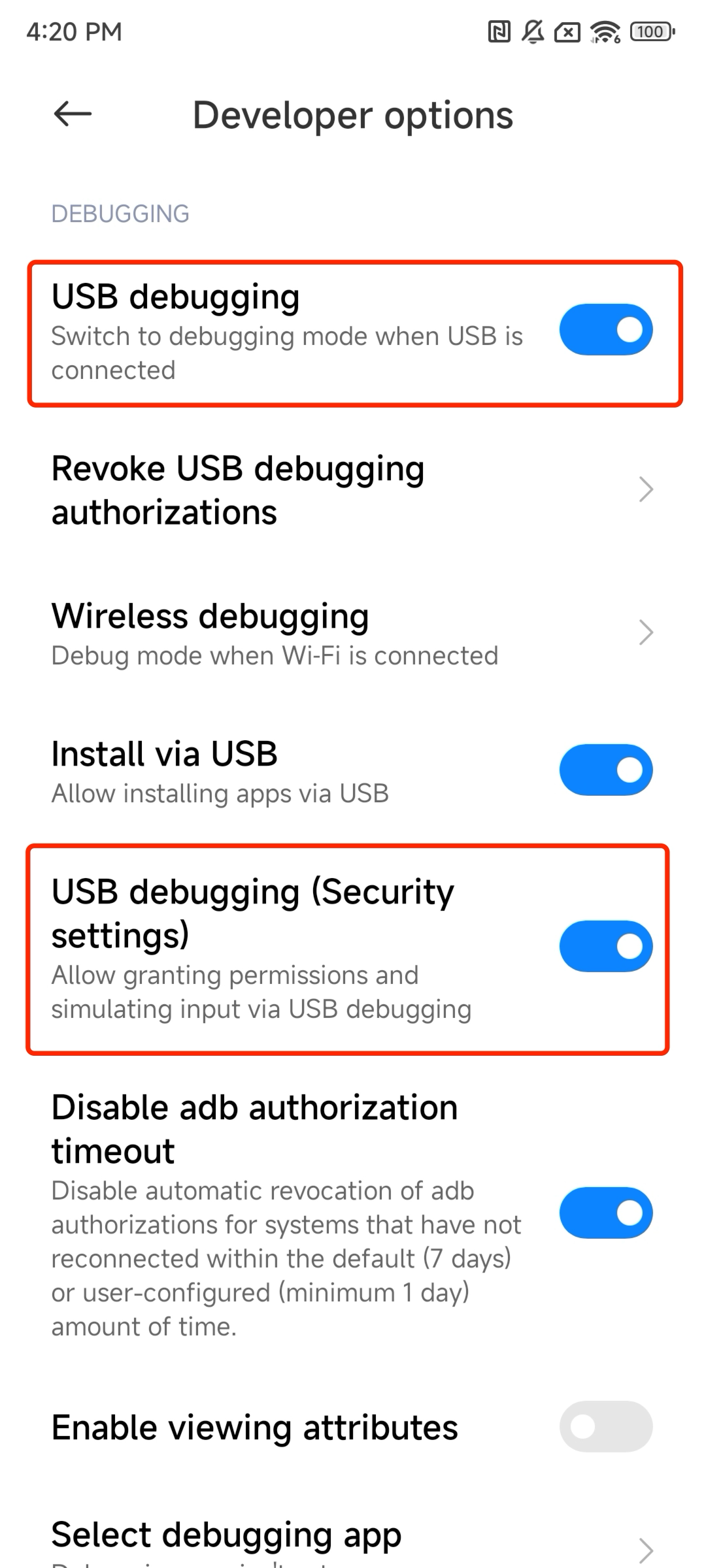
In the developer options of your Android device, enable 'USB debugging'. If 'USB debugging (Security settings)' exists, enable it as well. Then connect your Android device using a USB cable.
Verify the connection:
When you see the following output, it means the connection is successful: